
How-To guides
Step-by-step guides for every Budget Mate feature.
Recurring Transactions
Fri Sept 18, 2026
Set a transaction once and it repeats on your schedule: weekly, fortnightly, monthly, quarterly or yearly, with a reminder before it hits. Recurring transactions feed the future balance forecast.

Budgets & Recurring Budgets
Fri Sept 25, 2026
Pick a category, set the limit, and usage updates with every transaction you log. Recurring budgets roll over automatically each week/fortnight/month. Pin budgets to the dashboard, include them in your forecast — the dashboard alerts you automatically when you're close to a limit or have crossed one.

Settings: Personalise The Budget Mate
Fri Oct 2, 2026
Make the app yours: appearance and colours, currency and date format, sidebar reorder and show/hide, dashboard widgets show/hide/reorder, and rename/add/delete income and expense categories.

Reminders & Calendar
Fri Oct 9, 2026
See every transaction, recorded and projected, colour-coded in daily, weekly or monthly view. Sync to Calendar exports your recurring transactions and bills as a .ics file for Google Calendar, Apple Calendar or Outlook.

Goals: Create a Goal and Fund It
Fri Oct 16, 2026
Create a savings goal, link transactions to it, and watch it fund. Track progress as you log.

Savings: Create, Simulate & Fund
Fri Oct 23, 2026
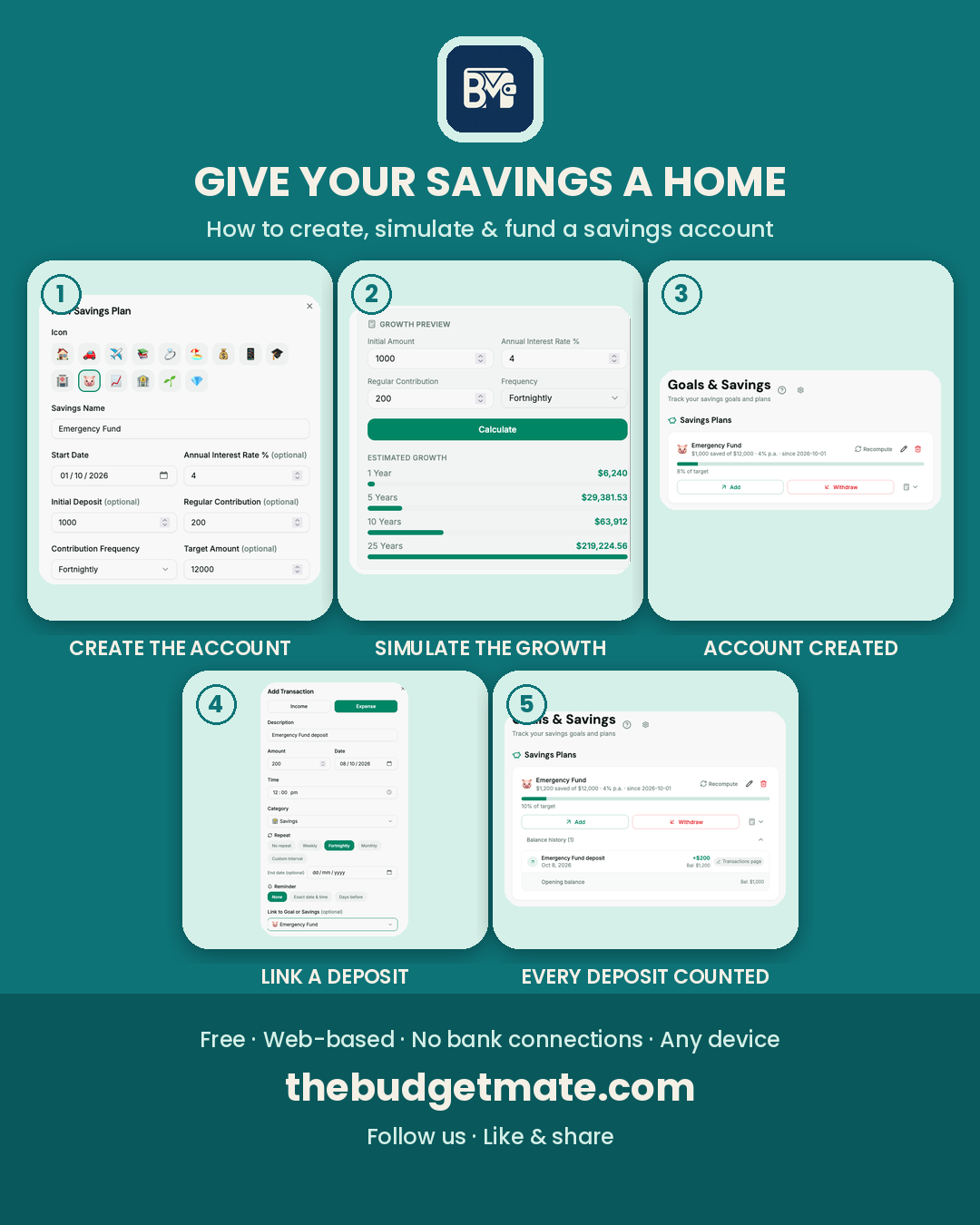
Give your savings a home — interest included. Feature Friday: how to use Savings in The Budget Mate. Create a savings account: name it, and optionally add an annual interest rate, an initial deposit and a regular contribution. Simulate the estimated growth before you create it, then fund it by linking a deposit to the account or making it recurring — every linked deposit updates the balance, with the full transaction history a tap away.
Bills: Never Miss a Payment
Fri Oct 30, 2026
Recurring transactions charge themselves; bills wait for you. Add council rates, strata, rego or any one-off bill with its due date: the Bills page keeps them in one list with a Total Upcoming figure, drops upcoming bills into your dashboard alerts, and includes them in your future balance forecast. Nothing becomes a transaction until you mark it paid, and paying a repeating bill rolls it forward to its next due date.
